

<?xml version="1.0" encoding="utf-8"?>
  <feed xmlns="http://www.w3.org/2005/Atom" xml:lang="en">

  <title>Chen Yangjian's Feed</title>
  <subtitle>Developer</subtitle>
  <link href="http://cyj.me/2011/feed/" hreflang="en" rel="self" type="application/atom+xml"/>
  <link href="http://cyj.me/2011/" hreflang="en" rel="alternate" type="text/html"/>

  <updated>2014-03-08T16:54:52+11:00</updated>
  <generator uri="http://staceyapp.com/" version="2.1.0">Stacey</generator>

  <author>
    <name>Chen Yangjian</name>
    <uri>http://cyj.me/2011</uri>
  </author>

  <id>tag:localhost,2014:/feed/</id>
  <rights>©2014 Chen Yangjian</rights>
    <entry>
   <title>Projects</title>
   <id>tag:localhost,2014:/projects/</id>
   <updated>2014-03-08T16:54:52+11:00</updated>
   <link rel="alternate" type="text/html" href="http://cyj.me/2011/projects/" />
   <content type="xhtml" xml:lang="en">
      <div xmlns="http://www.w3.org/1999/xhtml">


      </div>
   </content>
</entry>
    <entry>
   <title>鹿木</title>
   <id>tag:localhost,2014:/projects/lomoo/</id>
   <updated>2014-03-08T16:54:52+11:00</updated>
   <link rel="alternate" type="text/html" href="http://cyj.me/2011/projects/lomoo/" />
   <content type="xhtml" xml:lang="en">
      <div xmlns="http://www.w3.org/1999/xhtml">


            <p><a href="http://jakeslomoo.appspot.com">鹿木</a>是一个构建于 App Engine 上的图片分享程序，使用 Python 开发。开发框架采用了 django，并应用到了许多开源的库，比如 PyRSS2Gen 等。</p>

<p>初衷是有个不一样的相册，图片展示的风格是尽量最大化，在大显示器上得到最具冲击力的效果。因为一直没有好器材好技术，目前上佳的图片寥寥无几。</p>

<p>鹿木其名，取自作者的家乡，浙江省瑞安市鹿木乡。名字典出何故如今恐已无从考。
鹿木是 MIT 协议授权的，<a href="http://code.google.com/p/lomoo/">开放源代码</a>。</p>

<p><a href="http://jakeslomoo.appspot.com">lomoo</a> is an album developed with Python and Django on Google App Engine. It's <a href="http://code.google.com/p/lomoo">open source</a>.</p>


      </div>
   </content>
</entry>

  <entry>
   <title>西园五虎</title>
   <id>tag:localhost,2014:/projects/xiyuan5hu/</id>
   <updated>2014-03-08T16:54:52+11:00</updated>
   <link rel="alternate" type="text/html" href="http://cyj.me/2011/projects/xiyuan5hu/" />
   <content type="xhtml" xml:lang="en">
      <div xmlns="http://www.w3.org/1999/xhtml">


            <p>公司里多有饭局，同事间一起吃饭，买单的时候不 AA 会尴尬，AA 又麻烦，钞票递来递去，找零成了麻烦。
于是轮流付，然而饭局参与人员多有变更，记忆便不太靠谱。标哥弄了个 Excel 表，我画蛇添足，
做了这个小程序用来自动化。</p>

<p>原先是 Java 写的，可以到处 Excel，改成 Python 之后，还没试过 Python 的 Office 文档操作库。</p>

<p>理论上，任何有 Google 帐号的人都可以建立、管理自己的小饭团。人格保证，本程序不会对记录的用户邮箱做任何坏事。</p>


      </div>
   </content>
</entry>

  <entry>
   <title>袁天罡称骨术</title>
   <id>tag:localhost,2014:/projects/direfortune/</id>
   <updated>2014-03-08T16:54:52+11:00</updated>
   <link rel="alternate" type="text/html" href="http://cyj.me/2011/projects/direfortune/" />
   <content type="xhtml" xml:lang="en">
      <div xmlns="http://www.w3.org/1999/xhtml">


            <p>根据维基百科相关介绍做的<a href="http://direfortune.appspot.com/">算命小工具</a>，把介绍的算式自动化而已。<a href="http://code.google.com/p/direfortune/">開放源代碼</a>。</p>


      </div>
   </content>
</entry>

  <entry>
   <title>记帐本</title>
   <id>tag:localhost,2014:/projects/gainorspend/</id>
   <updated>2014-03-08T16:54:52+11:00</updated>
   <link rel="alternate" type="text/html" href="http://cyj.me/2011/projects/gainorspend/" />
   <content type="xhtml" xml:lang="en">
      <div xmlns="http://www.w3.org/1999/xhtml">


            <p>有段时间很想记账，不想“精通 Excel”，刚好想学 Python 和 Google App Engine，因此觉得做个记帐本练练手估计不错。</p>

<p>以此为开端，一发而不可收。</p>

<p>最开始了解的是 webapp 框架，后来跟风用 django，最大的原因是这名字很帅。</p>


      </div>
   </content>
</entry>

  <entry>
   <title>某实验室</title>
   <id>tag:localhost,2014:/projects/nmlab/</id>
   <updated>2014-03-08T16:54:52+11:00</updated>
   <link rel="alternate" type="text/html" href="http://cyj.me/2011/projects/nmlab/" />
   <content type="xhtml" xml:lang="en">
      <div xmlns="http://www.w3.org/1999/xhtml">


            <p>学校的一个实验室想要做个主页，辗转联系到我。</p>

<p>网站的空间、管理等，都是系里提供，丢活的人对此方面不是很理解，没有把数据库等信息告诉我。
我一开始也只是想把他们的资料用 HTML 标记下，CSS 搞搞，就差不多了。后来发现数据其实不少，尤其是各种列表、师生联系方式等。
就设计了一些文件结构，把资料都弄成 TXT，写了许多相应的 PHP 函数把页面搞出来。</p>

<p>后来有老板看了说需要后台方便管理。因为解释说明 FTP、文本编辑云云，其效不彰，只好照办。
幸亏之前的工作做得还算清爽，加个后台还算容易。</p>

<p>那段时间刚好 jQuery 也了解得差不多，就写了个插件用来实现广告牌类似的效果。</p>


      </div>
   </content>
</entry>


  <entry>
   <title>Resources</title>
   <id>tag:localhost,2014:/resources/</id>
   <updated>2014-03-08T16:54:52+11:00</updated>
   <link rel="alternate" type="text/html" href="http://cyj.me/2011/resources/" />
   <content type="xhtml" xml:lang="en">
      <div xmlns="http://www.w3.org/1999/xhtml">


      </div>
   </content>
</entry>
    <entry>
   <title>CSS Sprites</title>
   <id>tag:localhost,2014:/resources/css-sprites/</id>
   <updated>2014-03-08T16:54:52+11:00</updated>
   <link rel="alternate" type="text/html" href="http://cyj.me/2011/resources/css-sprites/" />
   <content type="xhtml" xml:lang="en">
      <div xmlns="http://www.w3.org/1999/xhtml">
            <img src="./content/3.resources/8.css-sprites/test-3.jpg" alt="Test 3." />
  <img src="./content/3.resources/8.css-sprites/snook-bg.jpg" alt="Snook bg." />
  <img src="./content/3.resources/8.css-sprites/qiushid-navitems.gif" alt="Qiushid navitems." />


      </div>
   </content>
</entry>
    <entry>
   <title>What is CSS Sprites</title>
   <id>tag:localhost,2014:/resources/css-sprites/intro/</id>
   <updated>2014-03-08T16:54:52+11:00</updated>
   <link rel="alternate" type="text/html" href="http://cyj.me/2011/resources/css-sprites/intro/" />
   <content type="xhtml" xml:lang="en">
      <div xmlns="http://www.w3.org/1999/xhtml">
            <img src="./content/3.resources/8.css-sprites/9.intro/Sprite-example.gif" alt="Sprite example." />


            <p>Web 是个很神奇的地方，很多时候会给你“OMG! The old things is new again!”的错觉。
比如初衷是数据表格的 <code>&#60;table/&#62;</code> 标签，会被用来取得更有弹性的布局效果；
比如 <code>&#60;h1/&#62;</code> 还是 <code>&#60;p class="title"/&#62;</code> 作为网站的标题，都可以成为争辩的话题；
比如 <code>&#60;canvas/&#62;</code> 和 Flash 的比较。</p>

<p>CSS Sprites 也是如此。</p>

<p>我们先把 CSS Sprites 这名字拆分一下，CSS 和 Sprites，CSS 么大家都知道，Cascading Styles Sheets，层叠样式表。
只不过它的层叠算法有的时候很奇怪，代码结构看着也不想表。但这不妨碍你把它去繁取简，
理解为样式（Style）。事实上在 Flex 里头，Adobe 就是这么做的。</p>

<p>而 Sprites 呢？查下字典，意为小精灵。在计算机图形的世界，
<a href="http://en.wikipedia.org/wiki/Sprite_%28computer_graphics%29">这个词的意思</a>
是一张二维的图片，用来嵌入到场景当中。通常它是由多张小图拼成的。同样，在 ActionScript 里面，
有个 <code>Class</code> 唤作
<a href="http://www.adobe.com/livedocs/flash/9.0/ActionScriptLangRefV3/flash/display/Sprite.html">Sprite</a>。
采取这种做法的原因，跟现在一样，是
<a href="http://www.reddit.com/r/programming/comments/d1b7w/til_about_css_sprites/c0wtlfs">速度</a>。
把一张大图载入内存，每次重绘的时候只改变它的显示位置，比每次重绘都把图片数据搞来搞去要经济很多。</p>

<p>而两个词结合起来，就是本文要说的，使用 CSS 应用古老的 Sprites 技术。在开始之前，我们先了解一下为什么。</p>

<p>在 YUI 的 Yslow 网站优化工具评分标准里头，有一项重要的评分标准是
<a href="http://yuiblog.com/blog/2006/11/28/performance-research-part-1/">减少资源请求次数</a>。
网页上各种菜单的图标，布局里的背景图片，
按钮等等，可以将这些图片弄到一张大图上，再在 CSS 中通过 <code>background-position</code> 制定需要显示的图片位置。
也就是让浏览器自己去调整显示结果，取得“抠”图的效果。它是一项网页优化的技术。</p>

<p>是否要使用这项技术已经不是个问题了，它无处不在。</p>

<p>【<time datetime="2010-08-15">8月15日</time>】有趣的是，在笔者写本文的时候，
CSS-Tricks 也<a href="http://css-tricks.com/css-sprites/">发了篇博文</a>。在“为什么”的部分说的比较清楚。</p>


      </div>
   </content>
</entry>

  <entry>
   <title>CSS</title>
   <id>tag:localhost,2014:/resources/css-sprites/css/</id>
   <updated>2014-03-08T16:54:52+11:00</updated>
   <link rel="alternate" type="text/html" href="http://cyj.me/2011/resources/css-sprites/css/" />
   <content type="xhtml" xml:lang="en">
      <div xmlns="http://www.w3.org/1999/xhtml">
            <img src="./content/3.resources/8.css-sprites/8.css/google_sprites_1.jpg" alt="Google sprites 1." />


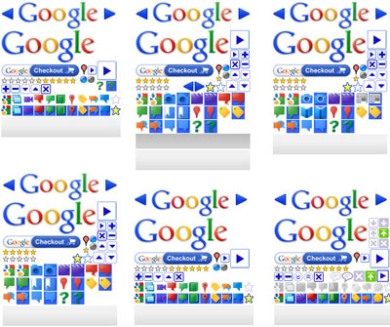
            <p>CSS 的中文意思，前面介绍过了。对于它的意义、简单语法等，可以参考我的 <a href="/resources/html-css">HTML &#38; CSS</a>。</p>

<p>先说基本，<code>background</code> 属性的语法。示例声明（来自<a href="http://jakeslomoo.appspot.com">鹿木</a>）。
这是一个简写。在 CSS 中这种简写很多，使用最多的就是 padding 和 margin 的语法。</p>

<pre><code>background: #000 url("/picture/3003_m.jpg") no-repeat scroll center top;
</code></pre>

<p>接着说背景声明。详细属性分为：</p>

<ul>
<li><code>background-color</code> 各种颜色；</li>
<li><code>background-image</code> 背景图，可以是 <code>url()</code>，也可以是 BASE64 编码的图片；</li>
<li><code>background-repeat</code> 重复模式，no-repeat, repeat, repeat-x, repeat-y</li>
<li><code>background-attachment</code> 是否跟随页面滚动滚动，scroll, fixed</li>
<li><code>background-position</code></li>
</ul>

<p>上述简写便是以这个顺序。详细语法可以参考 <a href="http://www.w3schools.com/css/css_background.asp">w3school</a>。
我们要讲的重头是 <code>background-position</code>。它的值的模式为 <code>xpos ypos</code>。
<code>xpos</code> 可以是 left, center, right, x% 或者实际的像素单位的坐标；
<code>ypos</code> 则是 top, middle, bottom, y% 或者实际坐标。</p>

<p>了解这个之后，我们就可以做个示例了。</p>


      </div>
   </content>
</entry>

  <entry>
   <title>Demo 1</title>
   <id>tag:localhost,2014:/resources/css-sprites/demo1/</id>
   <updated>2014-03-08T16:54:52+11:00</updated>
   <link rel="alternate" type="text/html" href="http://cyj.me/2011/resources/css-sprites/demo1/" />
   <content type="xhtml" xml:lang="en">
      <div xmlns="http://www.w3.org/1999/xhtml">


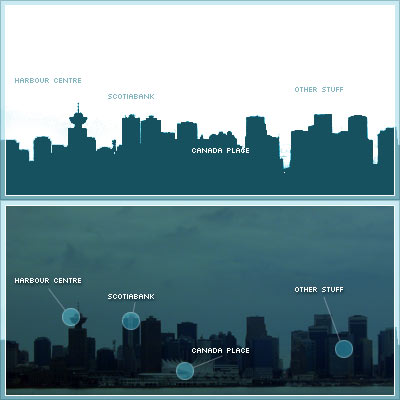
            <p>这个示例来自于 <a href="http://www.alistapart.com/articles/sprites">A List Apart</a>。
我们要做的事情就是，把上一节中的图片作 Sprites，做一个看起来还不错的导航栏。最终效果如右图所示：</p>

<p>先把 HTML 搞起来。通常写 HTML 的原则有两个：简介其一、语义化其二。把语义化作为重要准则的原因也有两个，
SEO 和可用性。因为搜索引擎的爬虫和屏幕阅读器都不会识别通过 CSS 后加的图片、文字，它们只认 HTML。
代码如右图下方所示。</p>

<p>接下来，配上 CSS。首先，将这个菜单的高宽设置为背景图大小，配上背景图；把 <code>&#60;li/&#62;</code> 的默认属性重置掉。
关于 <code>position</code> 的部分说起来容易话长，
对这方面不熟的童鞋建议看看<a href="http://www.barelyfitz.com/screencast/html-training/css/positioning/">《十步走学会 CSS Position》</a>。
简单地说这里的代码就是让每个菜单条目使用绝对定位，方便布置鼠标悬停的效果。</p>

<pre name="code" class="css">
#skyline {
    width: 400px; height: 200px;
    background: url(test-3.jpg);
    margin: 10px auto; padding: 0;
    position: relative;
}
#skyline li {
    margin: 0; padding: 0; list-style: none;
    position: absolute; top: 0;
}
#skyline li, #skyline a {
    height: 200px; display: block;
}
#panel1b {left: 0; width: 95px;}
#panel2b {left: 96px; width: 75px;}
#panel3b {left: 172px; width: 110px;}
#panel4b {left: 283px; width: 117px;}
</pre>

<p>布置好菜单之后，通过 <code>a:hover</code> 加上特效：</p>

<pre name="code" class="css">
#panel1b a:hover {
    background: transparent url(test-3.jpg) 0 -200px no-repeat;
}
#panel2b a:hover {
    background: transparent url(test-3.jpg)
    -96px -200px no-repeat;
}
#panel3b a:hover {
    background: transparent url(test-3.jpg)
    -172px -200px no-repeat;
}
#panel4b a:hover {
    background: transparent url(test-3.jpg)
    -283px -200px no-repeat;
}
</pre>

<p>这个例子应用 CSS Sprites 的方式有点特别，经典应用方式是背景图片只指定一次，
需要的时候再去改 <code>background-position</code>。这个做法是个 Workaround，而非 Fix，主要原因是
IE6 里头的一个 bug：如果 IE 的缓存控制设置为不缓存，每次都去服务器取资源的话，
背景图会闪（<a href="http://ieflicker.com/">解决方式</a>）。</p>

<p>下面，我们通过求是设计的博客，来做一个更为纯粹的示例。</p>


      </div>
   </content>
</entry>

  <entry>
   <title>Demo 2 - Blog of Qiushi Design</title>
   <id>tag:localhost,2014:/resources/css-sprites/demo2/</id>
   <updated>2014-03-08T16:54:52+11:00</updated>
   <link rel="alternate" type="text/html" href="http://cyj.me/2011/resources/css-sprites/demo2/" />
   <content type="xhtml" xml:lang="en">
      <div xmlns="http://www.w3.org/1999/xhtml">


            <p>求是博客的导航栏，是一个比上例更为经典的 CSS Sprites 应用。
<a href="http://blog.qiushid.com/wp-content/themes/qiushid/images/navitems.gif">它的背景图片</a>
是一张包括常态、鼠标悬停之后、disable 之后三个效果的图片，并对应求是设计各个模块。</p>

<p>HTML 如前文所述，遵循简明扼要、语义化的规则。注意这里虽然最终效果里头并不需要文字，
但是依然写明，并通过 <code>text-indent</code> 将它设为不可见。实际的代码中，还含有 <code>title</code>、<code>target</code>
等属性。<code>title</code> 用来鼠标悬停时提示说明，<code>target="_blank"</code> 则告诉浏览器要新开一个窗口或者标签。
此处为了简明，略去了。有 Firebug 的童鞋，可以查看右侧的示例元素。</p>

<p>关于 <code>#menu li a</code> 的 CSS 声明：</p>

<pre name="code" class="css">
#menu li a {
    background:url("http://blog.qiushid.com/wp-content/themes/qiushid/images/navitems.gif") no-repeat scroll 0 -468px transparent;
    display:block;
    float:left;
    height:26px;
    text-indent:-999em;
    width:85px;
}
</pre>

<p>因为每个模块对应的图标都不一样，所以实际位置通过 <code>#menu li a.class</code> 指定。以首页（<code>home</code>）为例：</p>

<pre name="code" class="css">
#menu li.home a {
    background-position: 0 -182px;
}
#menu li.home a:hover {
    background-position: 0 0;
}
</pre>

<p>其余代码可以参考<a href="http://blog.qiushid.com/wp-content/themes/qiushid/style.css">求是博客的 CSS 文件</a>。</p>


      </div>
   </content>
</entry>

  <entry>
   <title>Demo 3 - (Blink) With JavaScript</title>
   <id>tag:localhost,2014:/resources/css-sprites/demo3/</id>
   <updated>2014-03-08T16:54:52+11:00</updated>
   <link rel="alternate" type="text/html" href="http://cyj.me/2011/resources/css-sprites/demo3/" />
   <content type="xhtml" xml:lang="en">
      <div xmlns="http://www.w3.org/1999/xhtml">


            <p>A List Apart 在几年后<a href="http://www.alistapart.com/articles/sprites2/">又发一文</a>，
加入了 JavaScript 的部分。
使用 jQuery 的 <code>.fadeIn(), slideDown()</code> 等 UI 方面的方法，来模拟淡入淡出等效果。
原文的示例代码不很清爽，就不再转用。下面是参考
<a href="http://api.jquery.com/hover/"><code>hover</code> 文档</a>
做的求是博客导航栏的基础上制作的示例。</p>

<p>有没有 jQuery is the new <code>&#60;blink/&#62;</code> 的错觉？廉价的特效，廉价的代码：</p>

<pre name="code" class="js">
    $("#qiushid-menu").find("a").hover(function() {
        $(this).fadeOut(500, function() {
            $(this).fadeIn(500);
        });
    }, function() {
        $(this).fadeIn(100);
    });
</pre>

<p>这么做的问题也很明显。如果用户玩导航栏，在那上面划来划去，之前的淡入淡出效果并不会消失，
而是慢慢做完。后果就是，鼠标甩过去之后导航栏闪个不停。修正的方法是每次
<code>mouseenter</code>、<code>mouseleave</code> 的时候判断是否正在特效进行中，如果是就清除。
下面的例子思路跟这个是一样的，所以这个例子的方法我就不再说了。</p>


      </div>
   </content>
</entry>

  <entry>
   <title>Demo 4 - (Marquee) With JavaScript</title>
   <id>tag:localhost,2014:/resources/css-sprites/demo4/</id>
   <updated>2014-03-08T16:54:52+11:00</updated>
   <link rel="alternate" type="text/html" href="http://cyj.me/2011/resources/css-sprites/demo4/" />
   <content type="xhtml" xml:lang="en">
      <div xmlns="http://www.w3.org/1999/xhtml">


            <p>下面，我们做个高级一点的，jQuery 版本的 <a href="http://www.htmlmarquee.com/"><code>&#60;marquee/&#62;</code></a>。
我们知道，求是设计的导航栏的背景图是在鼠标悬停（hover）的时候，通过调整
<code>background-position</code> 得到效果。现在呢，就要用 JavaScript 让这个过程慢一点。</p>

<p>实际执行代码请查看本页面源代码末尾的 JavaScript 部分，这里就伪代码介绍一下。</p>

<pre name="code" class="js">
    var yPosMap = {     // 最独立的办法自然是从 CSS 里头取，但是感觉费力
        home: [-182, 0],
        camp: [-260, -78],
        bookstore: [-286, -104],
        microblog: [-338, -156],
        network: [-312, -130]
    };
    var timerMap = {};  //  每个动画的定时器应该是独立的

    $marqueemenu.find('a').hover(function() {
        animate(this, 'show');
    }, function() {
        animate(this, 'hide');
    });

    function animate(block, mode) {
        clearTimers(clsName);     // 清除正在进行的动画
        if (reachTargetPosition()) {
            reset();
            return;               // 已经到了
        }
        timerMap[clsName] = setInterval(function() {
            pos = getYPos($a);
            /*
             * 最关键的语句，CSS Sprites 就是这么回事：
             */
            $a.css('background-position', '0 '+(pos+delta)+'px');
            if (reachTargetPostion()) {
                clearInterval(timerMap[clsName]);
                reset();
            }
        }, 10);
    }
</pre>


      </div>
   </content>
</entry>

  <entry>
   <title>Demo 5 - jQuery.animate()</title>
   <id>tag:localhost,2014:/resources/css-sprites/demo5/</id>
   <updated>2014-03-08T16:54:52+11:00</updated>
   <link rel="alternate" type="text/html" href="http://cyj.me/2011/resources/css-sprites/demo5/" />
   <content type="xhtml" xml:lang="en">
      <div xmlns="http://www.w3.org/1999/xhtml">


            <p>我们的示例到这还没结束。</p>

<p>jQuery 自带了个 <a href="http://api.jquery.com/animate/"><code>.animate()</code></a>，但是对个别 CSS
属性的动画支持并不好。有达人做了个
<a href="http://exteenscript.googlecode.com/files/jquery.bgpos.js">jQuery Bg Pos 补丁</a>
让 jQuery 可以以 <code>background-position</code> 做动画。实际效果可以看右方示例。
有没有觉得示例四很有重复发明轮子的嫌疑？</p>

<p>详细内容，不妨移步
<a href="http://snook.ca/archives/javascript/jquery-bg-image-animations/">Snook 的博文</a>
和<a href="http://snook.ca/technical/jquery-bg/">他的示例</a>。这里简单讲述一下用法。</p>

<p>首先要在页面上引入 jQuery 与 jQuery.bgPos 插件。后者的内容并不多，
不妨把它并入你的网站的主 JavaScript 文件里头去。</p>

<pre name="code" class="html">
lt;script type="text/javascript" src="jquery-1.4.2.min.js">lt;/script>
lt;script type="text/javascript" src="jquery.bgpos.js">lt;/script>
</pre>

<p>然后是使用：</p>

<pre name="code" class="js">
    $('#snook-menu').find('a')
        .css( {backgroundPosition: "-20px 35px"} )
        .mouseover(function(){
            $(this).stop().animate({backgroundPosition:"(-20px 94px)"},
                                   {duration:500})
        })
        .mouseout(function(){
            $(this).stop().animate({backgroundPosition:"(40px 35px)"},
                                   {duration:200, complete:function(){
                $(this).css({backgroundPosition: "-20px 35px"})
            }})
        });
</pre>

<p>为需要特效的空间注册鼠标移入移出的响应函数，也可以使用前面示例的 <code>.hover()</code> 简写。
重点代码是 <code>.animate()</code> 的参数部分。第一个就是特效的结束值，<code>.animate()</code>
会根据这个值计算应该如何动画，详细的过程与示例四的 <code>animate()</code> 函数相仿。</p>

<p>第二个（<code>{duration:200, complete:function(){}}</code>）是其他参数，前者是动画的持续时间，
后者是当动画完成之后的回调。示例中的回调将控件重置，主要是针对动画结束背景图位置有偏差的情况。</p>


      </div>
   </content>
</entry>

  <entry>
   <title>Summary</title>
   <id>tag:localhost,2014:/resources/css-sprites/summary/</id>
   <updated>2014-03-08T16:54:52+11:00</updated>
   <link rel="alternate" type="text/html" href="http://cyj.me/2011/resources/css-sprites/summary/" />
   <content type="xhtml" xml:lang="en">
      <div xmlns="http://www.w3.org/1999/xhtml">


            <p>看完本文，了解了这四个例子之后，我想你对 CSS Sprites 应该有很清楚的认知了。</p>

<p>最后广告一下：做前端开发，目前为止最好用的工具依然是
<a href="getfirefox.com">Firefox</a> + <a href="http://getfirebug.com/">Firebug</a> 组合。
<a href="www.google.com/chrome">Google Chrome</a>
的开发者工具也已经越来越完善，但是小细节总有不愉处，可能是我习惯了前者的缘故。
IE9 如今成了 Underdog，但是也在慢慢赶上。此外，最好整个 IE Tester。
当然，如果你的机器上还有 IE6，直接测也行。不过，</p>

<p>你的电脑上还有 <a href="http://isie6dead.com/">IE6</a>？</p>


      </div>
   </content>
</entry>


  <entry>
   <title>贪吃蛇</title>
   <id>tag:localhost,2014:/resources/snake/</id>
   <updated>2014-03-08T16:54:52+11:00</updated>
   <link rel="alternate" type="text/html" href="http://cyj.me/2011/resources/snake/" />
   <content type="xhtml" xml:lang="en">
      <div xmlns="http://www.w3.org/1999/xhtml">


      </div>
   </content>
</entry>

  <entry>
   <title>Balloons</title>
   <id>tag:localhost,2014:/resources/balloons/</id>
   <updated>2014-03-08T16:54:52+11:00</updated>
   <link rel="alternate" type="text/html" href="http://cyj.me/2011/resources/balloons/" />
   <content type="xhtml" xml:lang="en">
      <div xmlns="http://www.w3.org/1999/xhtml">


      </div>
   </content>
</entry>

  <entry>
   <title>Handles with jQuery</title>
   <id>tag:localhost,2014:/resources/handles/</id>
   <updated>2014-03-08T16:54:52+11:00</updated>
   <link rel="alternate" type="text/html" href="http://cyj.me/2011/resources/handles/" />
   <content type="xhtml" xml:lang="en">
      <div xmlns="http://www.w3.org/1999/xhtml">


      </div>
   </content>
</entry>

  <entry>
   <title>Canvas Clock</title>
   <id>tag:localhost,2014:/resources/clock/</id>
   <updated>2014-03-08T16:54:52+11:00</updated>
   <link rel="alternate" type="text/html" href="http://cyj.me/2011/resources/clock/" />
   <content type="xhtml" xml:lang="en">
      <div xmlns="http://www.w3.org/1999/xhtml">


      </div>
   </content>
</entry>

  <entry>
   <title>HTML & CSS</title>
   <id>tag:localhost,2014:/resources/html-css/</id>
   <updated>2014-03-08T16:54:52+11:00</updated>
   <link rel="alternate" type="text/html" href="http://cyj.me/2011/resources/html-css/" />
   <content type="xhtml" xml:lang="en">
      <div xmlns="http://www.w3.org/1999/xhtml">
            <img src="./content/3.resources/3.html-css/spaghetti.png" alt="Spaghetti." />
  <img src="./content/3.resources/3.html-css/whatyouwant.png" alt="Whatyouwant." />
  <img src="./content/3.resources/3.html-css/reform.png" alt="Reform." />
  <img src="./content/3.resources/3.html-css/neet.png" alt="Neet." />
  <img src="./content/3.resources/3.html-css/css_context.png" alt="Css context." />
  <img src="./content/3.resources/3.html-css/box.png" alt="Box." />


      </div>
   </content>
</entry>

  <entry>
   <title>斗箕</title>
   <id>tag:localhost,2014:/resources/douji/</id>
   <updated>2014-03-08T16:54:52+11:00</updated>
   <link rel="alternate" type="text/html" href="http://cyj.me/2011/resources/douji/" />
   <content type="xhtml" xml:lang="en">
      <div xmlns="http://www.w3.org/1999/xhtml">


      </div>
   </content>
</entry>


  <entry>
   <title>About</title>
   <id>tag:localhost,2014:/about/</id>
   <updated>2014-03-08T16:54:52+11:00</updated>
   <link rel="alternate" type="text/html" href="http://cyj.me/2011/about/" />
   <content type="xhtml" xml:lang="en">
      <div xmlns="http://www.w3.org/1999/xhtml">
            <img src="./content/2.about/guitar.jpg" alt="Guitar." />


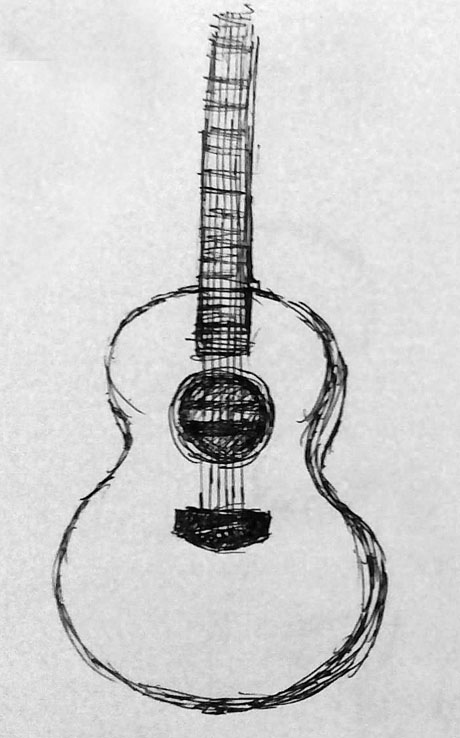
            <p>2004 年来到杭州求学，毕业之后没有返乡。码农，喜欢画画、按快门、弹吉他、看纸质小说等各种扮文青行径。
“志趣广博”，但一上场便露馅，乒乓球、台球、足球、篮球都会打（踢）一点；“博闻强识”，
例如 PHP、Perl、Python 等 P 字辈编程语言都写过不少，但面试官一问起，便支支吾吾辨不清个所以然。</p>

<p>如果你对我感兴趣，不妨也围观下<a href="http://blog.cyj.me">我的博客</a>，或者我的<a href="http://jakeslomoo.appspot.com">快门集</a>，
甚至是<a href="http://code.google.com/u/jakeplus/">我的代码们</a>。当然，我在网络上的坑还有很多，狡兔三窟嘛。</p>

<p>Chen Yangjian is an IT practitioner in Hangzhou. He graduated from Zhejiang University in 2008 and have been working as several roles in IT industry since then. Developed a blog system in PHP, scripted lots of Perl, wrote some SQL and PL/SQL, designed a few reports using both Actuate and iReport, programmed a lot Java to deal with FTP/Excel etc., and have been developing Python for a while.</p>

<p>Currently he is occupied as a Flex developer of stastestreet.com.</p>

<p>In the mean time, Yangjian has been learning acoustic guitar and painting on and off. There will be some work shown here too.</p>


      </div>
   </content>
</entry>


</feed>
<!-- Stacey(2.1.0). -->